
MeetPulse is a desktop application designed so that users can record meetings in real time by capturing their computer’s audio along with their microphone. This makes it agnostic to the meeting tool you’re working with — it doesn’t matter whether it’s Microsoft Teams, Zoom, Google Meet, or anything else. MeetPulse captures it all without issue.
It is the user’s responsibility to inform all meeting participants that recording is on.
The problem it solves
Today, nearly every new product, whether built with AI or not, is born as a SaaS. For a meeting assistant, that decision carries a particular cost: what it processes is the most sensitive material running through a company — conversations about clients, pricing, people, and strategy. A bot that joins a call and sends the audio to an external server, even one that complies with standard privacy policies and regulations, forces users to trust a third party before they even know whether the product is useful to them. And it requires a constant internet connection, even to review the transcripts of past meetings.
MeetPulse starts from the opposite question: what part of this work actually needs a server? Capturing audio, mixing it, transcribing it, summarizing it with a small model, indexing it, and searching it all fit on many high-end and even mid-range laptops today. At the same time, to cover the reality where companies can’t afford cutting-edge hardware, MeetPulse is compatible with the cloud through Vercel AI Gateway — allowing lower-end machines to run MeetPulse with its full feature set.
Vercel AI Gateway offers ZDR (Zero Data Retention) and No Training indicators (providers that state they do not use your data for training). These are available on Vercel’s PRO plans, and it’s the user’s responsibility to pay for the corresponding subscription to take advantage of these features when the business requires it.
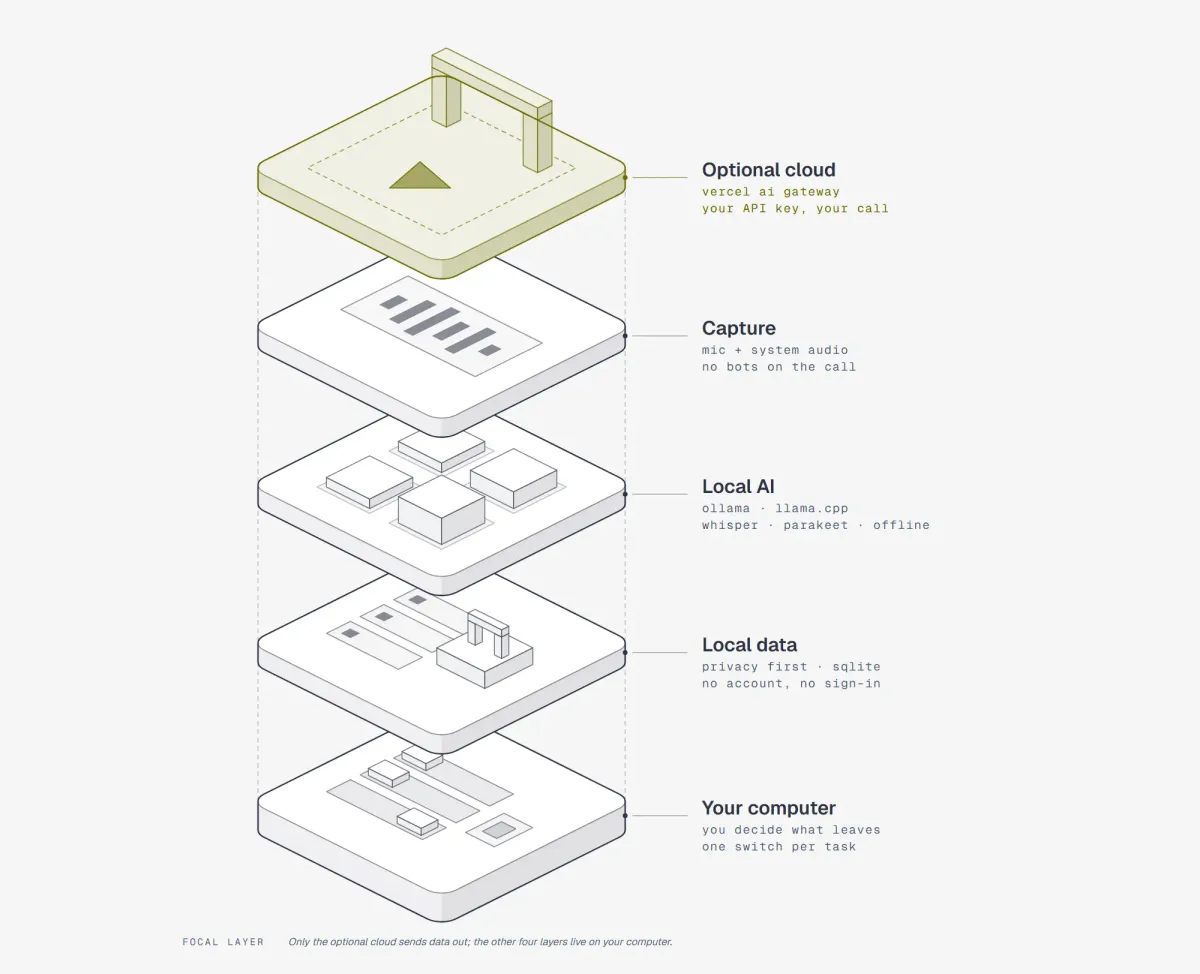
The flow of the solution
As noted in the points above, MeetPulse uses a hybrid strategy to do its work, letting users choose whether they want everything 100% local, everything 100% in the cloud, or — for each piece — what stays on their machine and what goes to the cloud. The decision is entirely in the user’s hands.
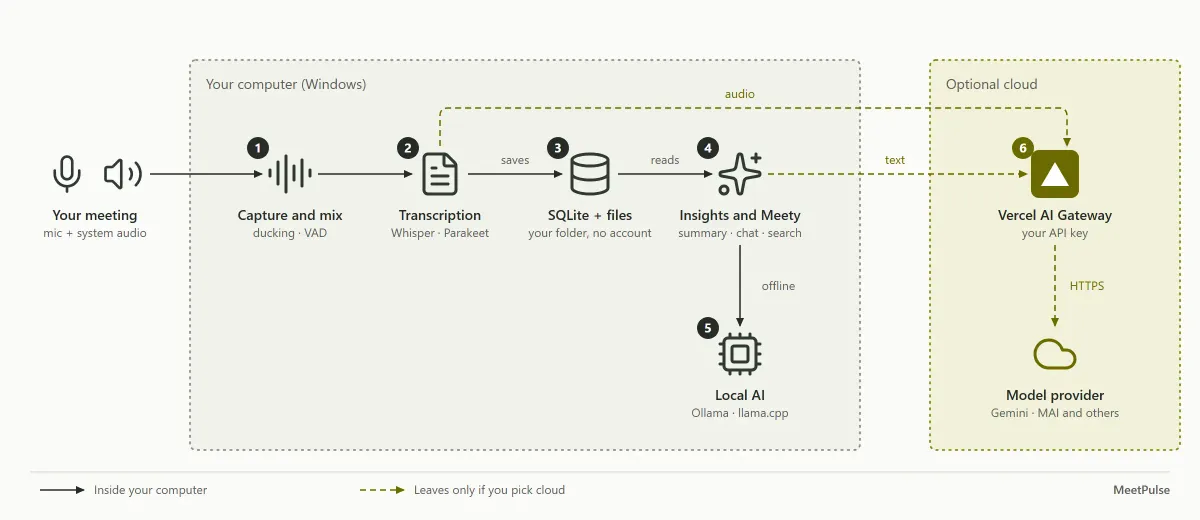
The flow shown in the diagram, in detail, looks like this:
- Capture and mixing: The microphone and system audio enter a processing engine in parallel; the audio is mixed, and the voice engine lets only speech through.
- Transcription: Locally, it uses Whisper or Parakeet, which turn speech into text almost instantly. When sending data to the cloud is acceptable, dedicated transcription models such as MICROSOFT MAI TRANSCRIBE 2 are recommended — it has given me excellent results.
- Local data: Meetings, transcripts, and summaries are stored in a local SQLite database on your machine, with no extra accounts required.
- Insights and Meety: Summaries, decisions, chat with citations, and search can all access this data. As an additional value proposition, Meety (MeetPulse’s live in-meeting assistant) also has a Coach mode that runs during the live meeting, supporting you with decisions, unclear points, and suggestions on how to handle each situation.
- Local AI: Ollama or llama.cpp let you run AI models such as Whisper or Parakeet on your machine. They also run generative AI models such as QWEN or Gemma to analyze transcripts and chat with Meety.
- 100% optional cloud: If you choose a cloud model — for transcription alone or for meeting analysis — the content leaves your machine through Vercel AI Gateway using an account you own.
The solution’s architecture
MeetPulse is a Tauri 2 app. The interface is built with Next.js using React and TypeScript, renders inside the system’s WebView, and all the heavy lifting lives in a RUST core. There is no separate backend service.
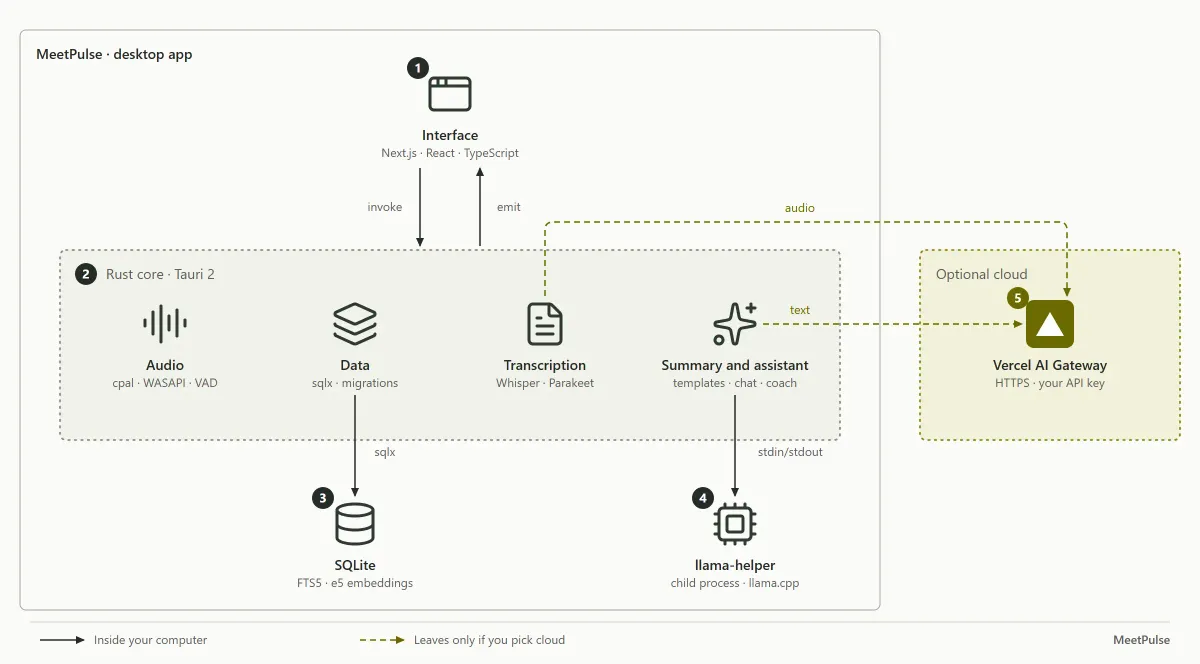
The layers in the diagram correspond to the following:
- Interface: Next.js and React inside Tauri’s WebView; they never touch audio or models.
- Rust core: Receives commands via
invoke, reports progress viaemit, and coordinates audio, transcription, summarization, and data. - SQLite: Meetings, transcripts, chats, and vector indexes (FTS5 and e5 embeddings).
- llama-helper: The core for running local models on the device.
- Vercel AI Gateway: The single door to the cloud, active only if the user chooses remote mode.
Try it today
MeetPulse is free, requires no account, and has no limit on meetings or hours. If you’re on Windows 10 or 11 (64-bit), you can be recording your next meeting in two minutes:
- Download the installer from meetpulse.vicentejorquera.dev or directly from MeetPulse_x64-setup.exe on GitHub Releases.
- Open the app and follow the welcome flow: audio permissions and downloading a model (a small Whisper model is enough to get started).
- Press Record on the Home screen. Everything else happens on your machine.
No account, no subscription, no bots in the call. If you later want the cloud, connect your own Vercel AI Gateway key and you decide what leaves your PC. If Windows SmartScreen warns you during installation, click “More info” and then “Run anyway” — the installers aren’t code-signed yet.
Prefer to look at the code first? Everything is on GitHub.
What’s next
MeetPulse is on Windows today; macOS and Linux are on the way, and the installers aren’t code-signed yet (SmartScreen will say so — and yes, it’s safe). Audio import for retranscribing old meetings is in beta. And yes: I accept issues and PRs on GitHub.
But beyond the roadmap, MeetPulse’s bet is simple: your meetings are yours. AI no longer needs a server to be useful; the server is now a choice, not a requirement. If that resonates with you, download it, record your next call, and ask it everything you don’t want to forget.
And if something doesn’t work the way you expected, let me know — I’d rather fix it than defend it.